
Did you know your Fit All Year Round Group Class Membership includes a monthly guest pass? Your guest pass makes it easy to bring a friend or family member to class — whether you attend with them or send them on their own!
You can use your monthly guest pass when booking through the Fit All Year Round app or from the class schedule on our website. Follow the step-by-step instructions below.
Booking Tip: If you plan to attend class with your guest, we recommend booking your guest at the same time you book your own class. If you’re sending your guest on their own, select “Only Guest” during booking to reserve a spot just for them.
How to Use Your Monthly Guest Pass in the Fit All Year Round App
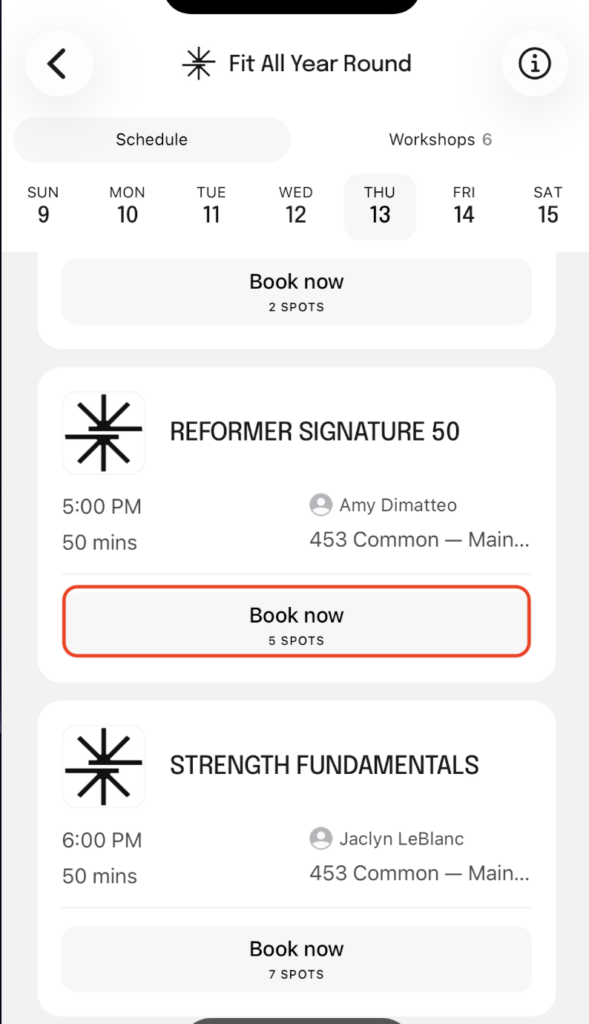
Step 1: Choose Your Class
Open the Fit All Year Round app and go to the class schedule.
Find the class you and your guest would like to attend, then tap Book now.
Step 2: Tap “Invite guests”
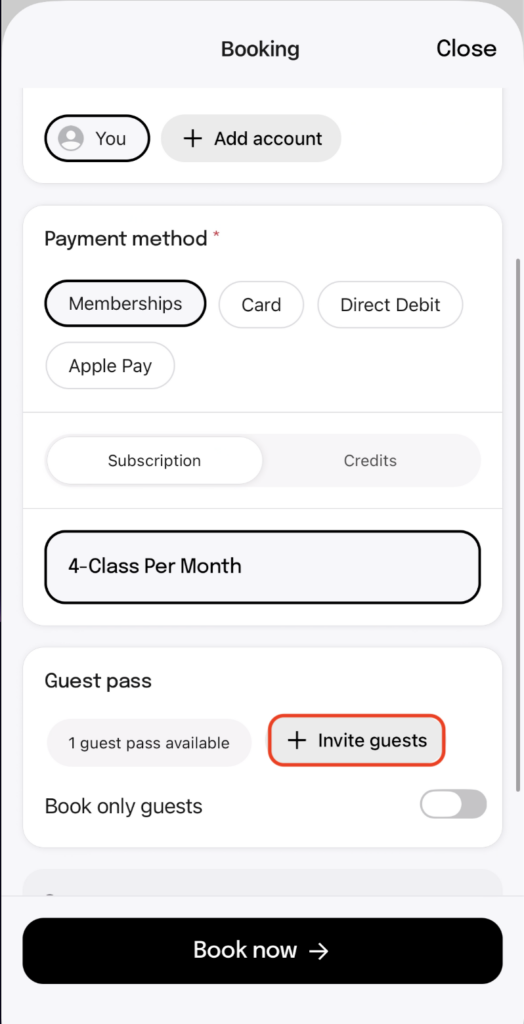
On the booking screen, make sure Memberships is selected as your payment method.
Scroll down until you see the Guest pass section. Your available guest pass will be shown here.
Tap Invite guests.
Not attending class with your guest? Select “Only Guest” to use your Guest Pass to book a spot for your guest without booking yourself into the class.
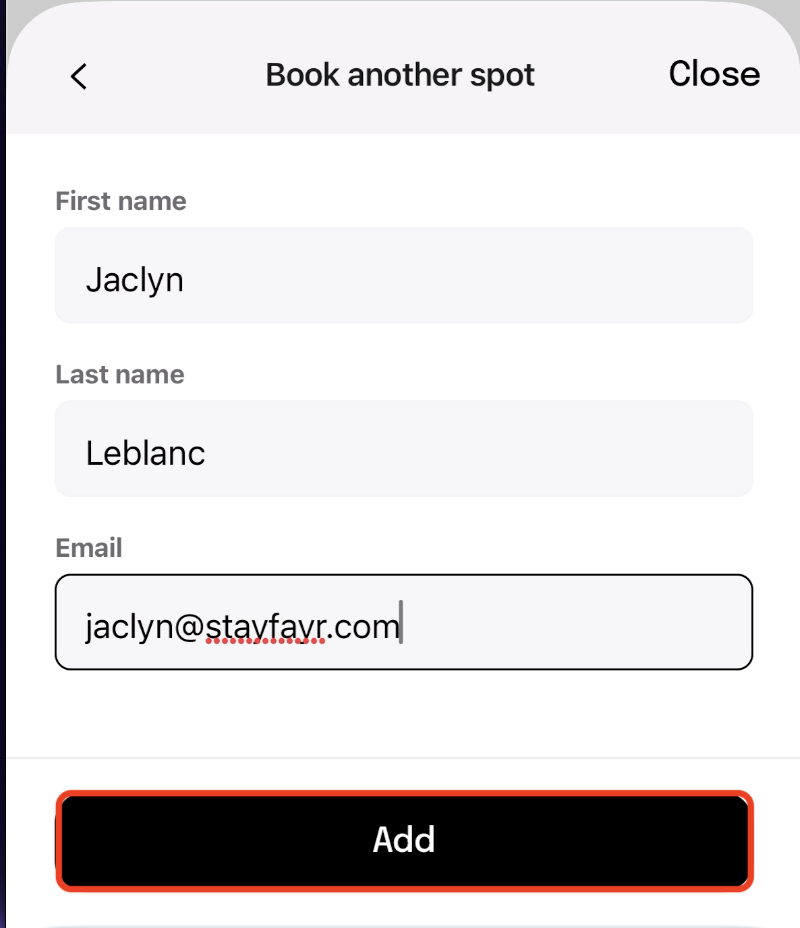
Step 3: Enter Your Guest’s Information
Enter your guest’s:
- First name
- Last name
- Email address
Once the information is correct, tap Add.
Not attending class with your guest? Select “Only Guest” to use your Guest Pass to book a spot for your guest without booking yourself into the class.
Step 4: Review Your Reservation
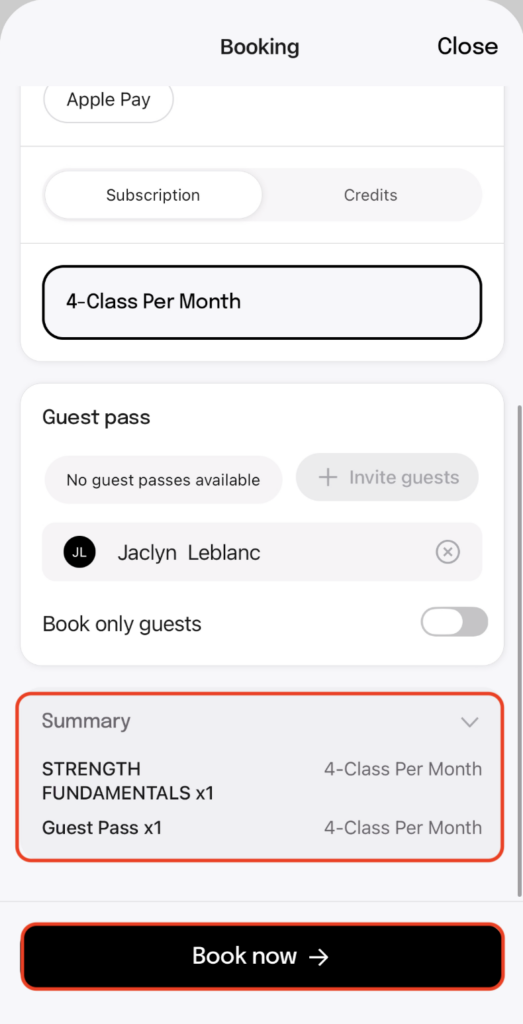
After adding your guest, you will return to the booking screen.
Your guest’s name should now appear in the Guest pass section.
Scroll down to the Summary and make sure you see:
Your class x1
Guest Pass x1
This means your monthly guest pass has been applied to your guest’s reservation.
Not attending class with your guest? Select “Only Guest” to use your Guest Pass to book a spot for your guest without booking yourself into the class.
Step 5: Complete Your Booking
Once everything looks correct, tap Book now at the bottom of the screen.
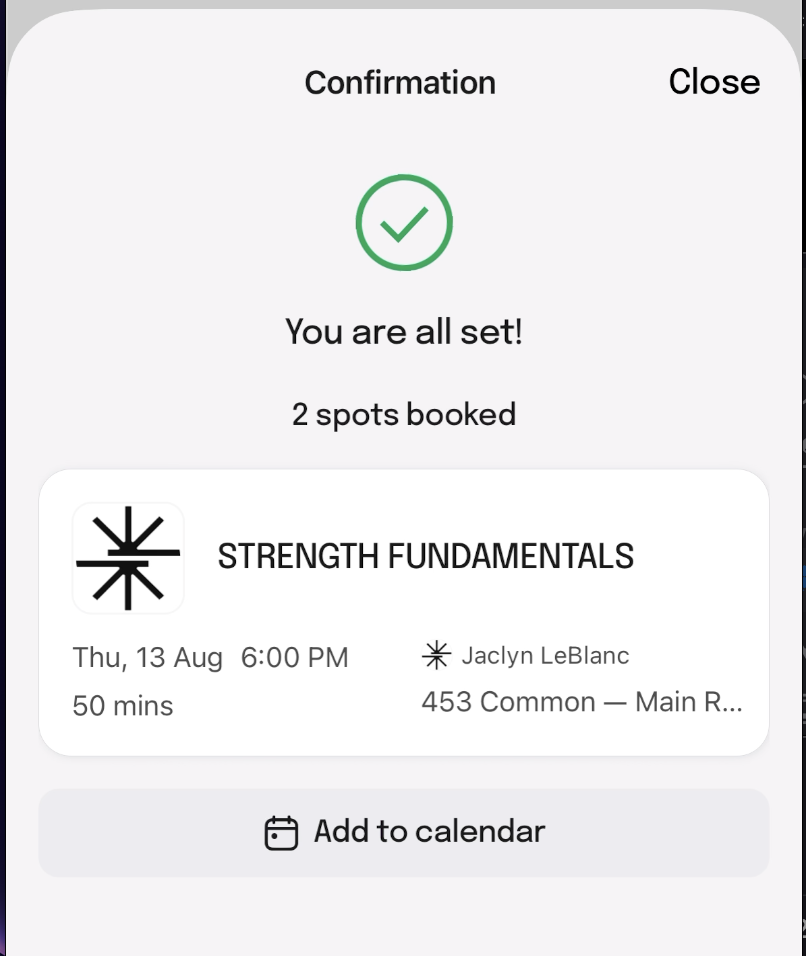
You should see a confirmation that says:
You are all set!
2 spots booked
That means both you and your guest are registered for class.
How to Use Your Monthly Guest Pass on the Website
Prefer booking from a computer? You can use your guest pass from the Fit All Year Round online class schedule, too.
Step 1: Find Your Class
Log into your Fit All Year Round account and view the class schedule.
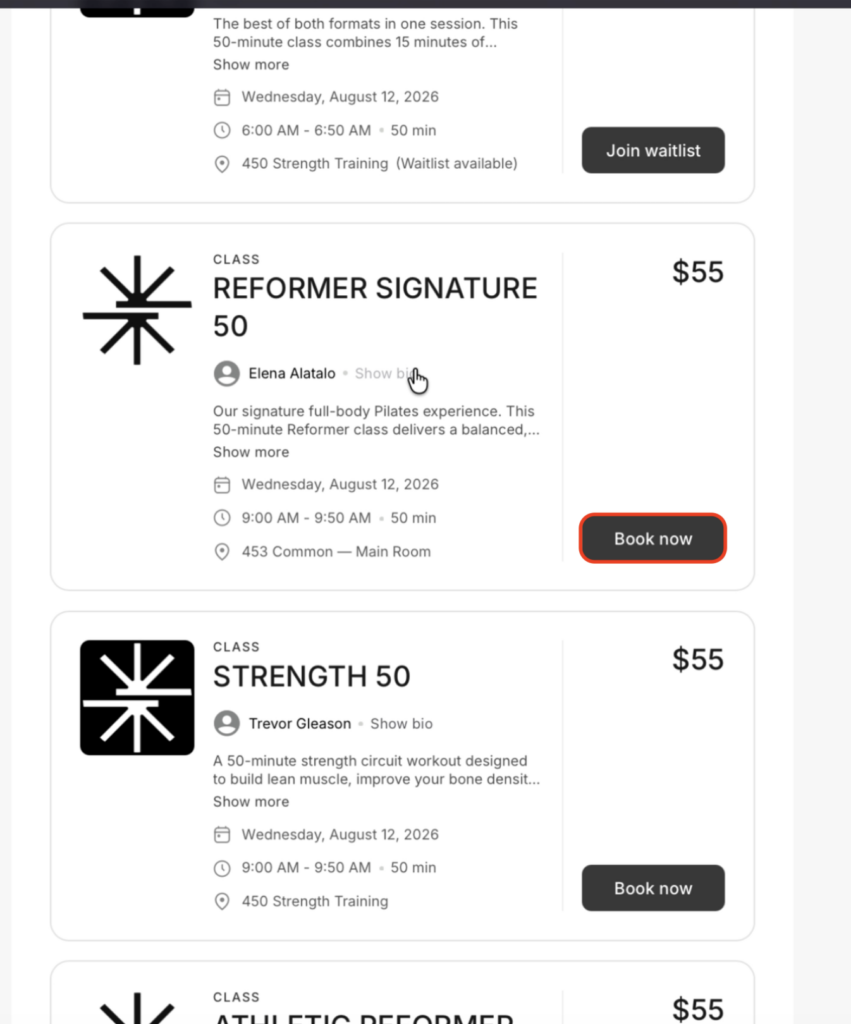
Find the class you and your guest would like to attend and click Book now.
Step 2 + 3: Choose to Bring a Guest + Enter Your Guest’s Information
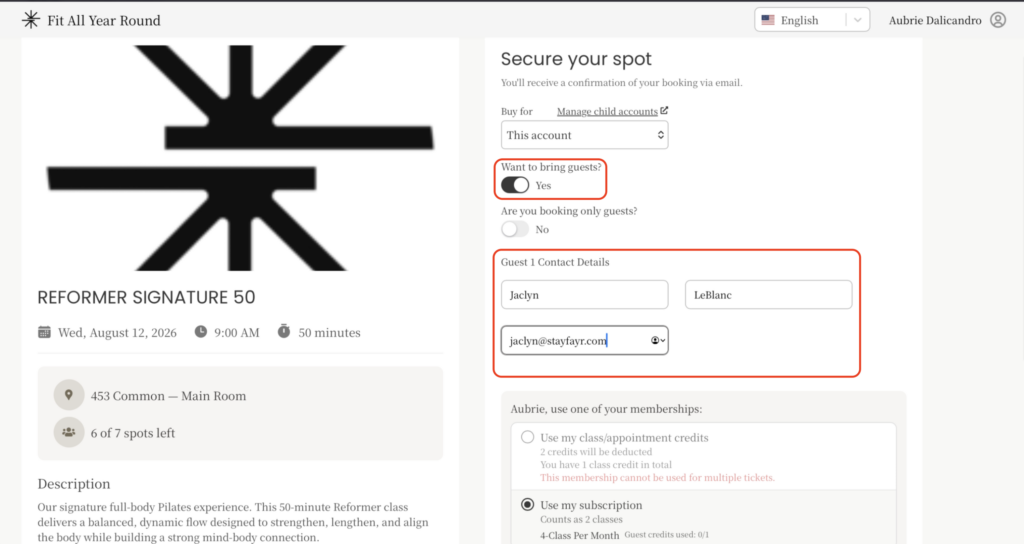
On the Secure your spot page, look for:
Not attending class with your guest? Select “Only Guest” to use your Guest Pass to book a spot for your guest without booking yourself into the class.
Want to bring guests with you?
Switch the toggle from No to Yes.
Once you select Yes, the Guest 1 Contact Details section will appear.
Enter your guest’s:
- First name
- Last name
- Email address
Step 4: Use Your Membership + Guest Pass
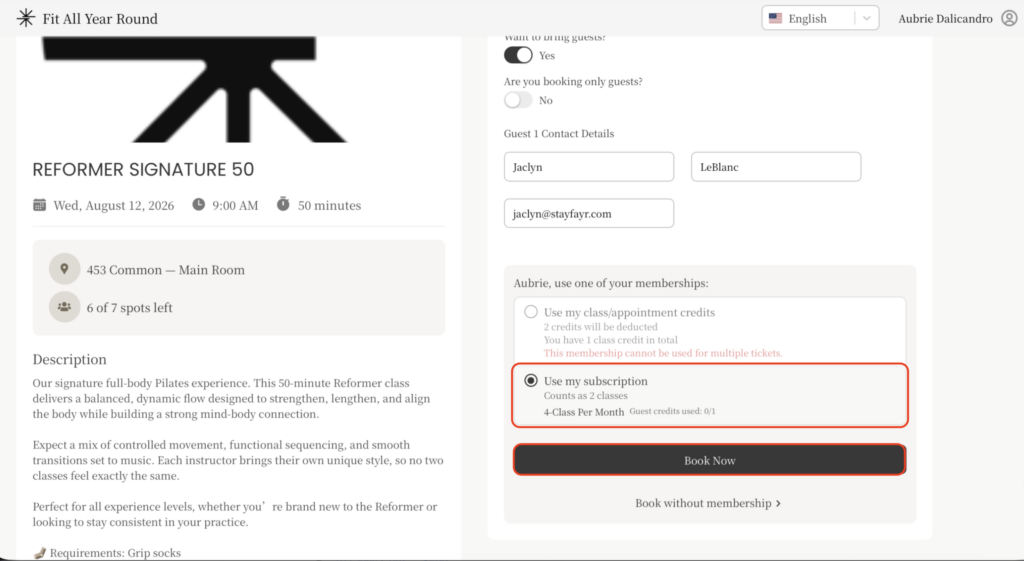
Under the membership section, select Use my subscription.
You should see your Group Class Membership listed along with your available guest credit.
Review the information to make sure your reservation and guest are both included, then click Book Now to complete the reservation.
Already Booked Your Own Spot?
We strongly recommend booking your guest at the same time you make your own class reservation whenever possible.
If you have already registered yourself for a class and are having trouble using your monthly guest pass to add your guest, don’t worry—we can help!
Email info@stayfayr.com and include the following information:
- Class date + time
- Guest first + last name
- Guest email address
- Guest phone number
- Guest date of birth
We’ll use that information to help get your guest registered.
Monthly Guest Pass FAQs
Eligible Fit All Year Round Group Class Memberships include a monthly guest pass that can be used to bring a guest to class.
We recommend booking your guest at the same time you book your own class. Classes have limited capacity, so booking both spots together gives you the best chance of attending together.
Before tapping Book now, check the Summary section. You should see your class reservation and Guest Pass x1.
After completing the reservation, your confirmation should show 2 spots booked.
If you’re already registered and are having trouble adding your guest, email info@stayfayr.com with the class date and time, plus your guest’s full name, email, phone number and date of birth.
If you believe you should have an available monthly guest pass but don’t see one in your account, email info@stayfayr.com and we’ll be happy to take a look.
Bring Someone Along to FAYR
Your monthly guest pass is a great opportunity to share your FAYR experience with a friend or family member.
Whether you’re booking through the Fit All Year Round app or online, we recommend reserving both spots at the same time so you can enjoy class together.
We can’t wait to welcome your guest to FAYR! 🤍

